> ## Documentation Index
> Fetch the complete documentation index at: https://docs.callrounded.com/llms.txt
> Use this file to discover all available pages before exploring further.
# Twilio Configuration
> Step-by-step guide to configure a SIP trunk with Twilio
## Prerequisites
* An active Twilio account
* A Twilio phone number
* Access to the Twilio console
## Step 1: Create a SIP Trunk in Twilio
1. Log in to the [Twilio Console](https://console.twilio.com)
2. Search for **SIP Trunk** in the search bar
3. Click **Create new SIP Trunk**
4. Give your trunk a name (e.g., "Rounded-Trunk")
## Step 2: Configure Origination
Origination defines how Twilio handles outbound calls from Rounded.
1. In your SIP Trunk, go to the **Origination** tab
2. Click **Add new Origination URI**
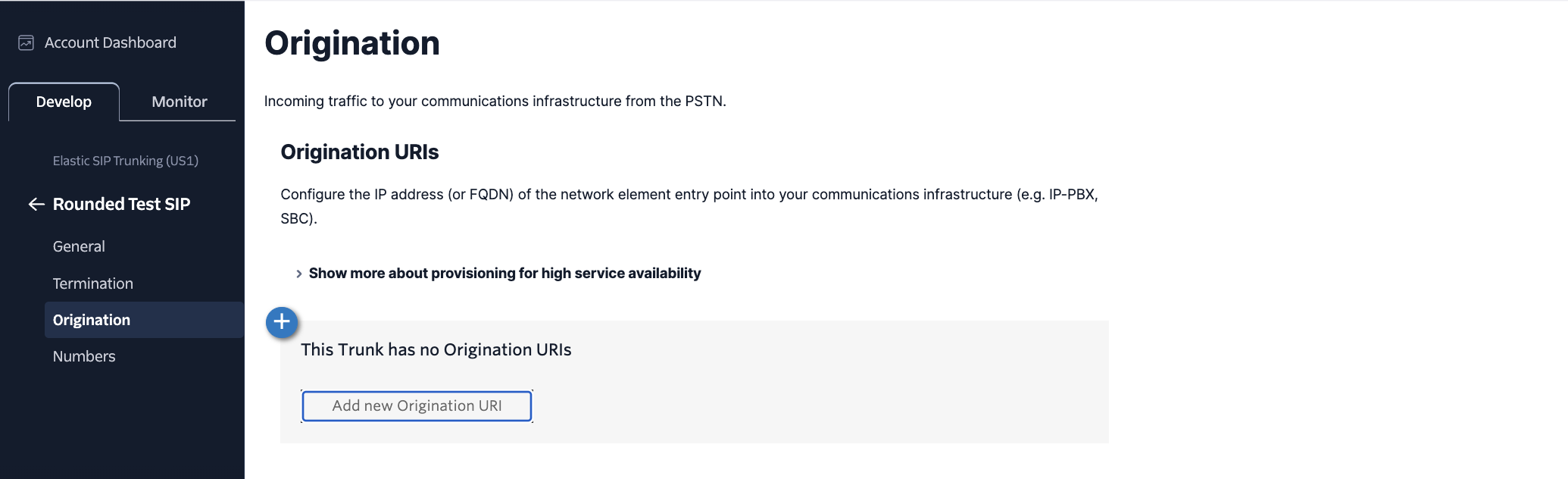 3. Configure:
* **SIP URI**: `sip:sip.callrounded.com;transport=tcp`
* **Priority**: 10
* **Weight**: 10
## Step 3: Configure Termination
Termination defines how Rounded can send calls via Twilio.
1. Go to the **Termination** tab
2. Note the displayed **Termination URI** (e.g., `your-trunk.pstn.twilio.com`)
3. Configure:
* **SIP URI**: `sip:sip.callrounded.com;transport=tcp`
* **Priority**: 10
* **Weight**: 10
## Step 3: Configure Termination
Termination defines how Rounded can send calls via Twilio.
1. Go to the **Termination** tab
2. Note the displayed **Termination URI** (e.g., `your-trunk.pstn.twilio.com`)
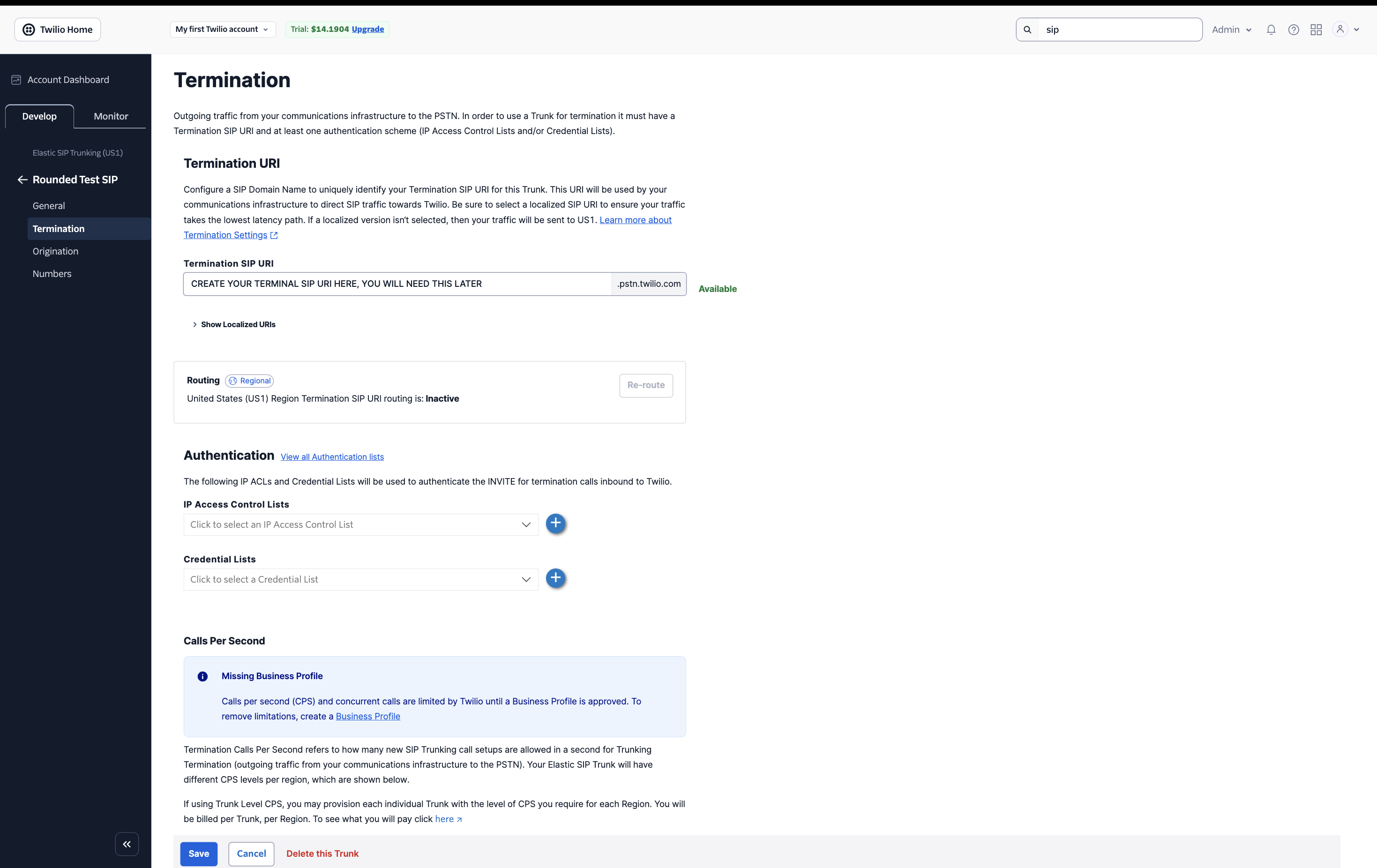 3. Configure authentication (choose one method):
### Method A: IP Access Control List (Recommended)
1. Click **+** next to **IP Access Control Lists**
2. Create a new Access Control List:
3. Configure authentication (choose one method):
### Method A: IP Access Control List (Recommended)
1. Click **+** next to **IP Access Control Lists**
2. Create a new Access Control List:
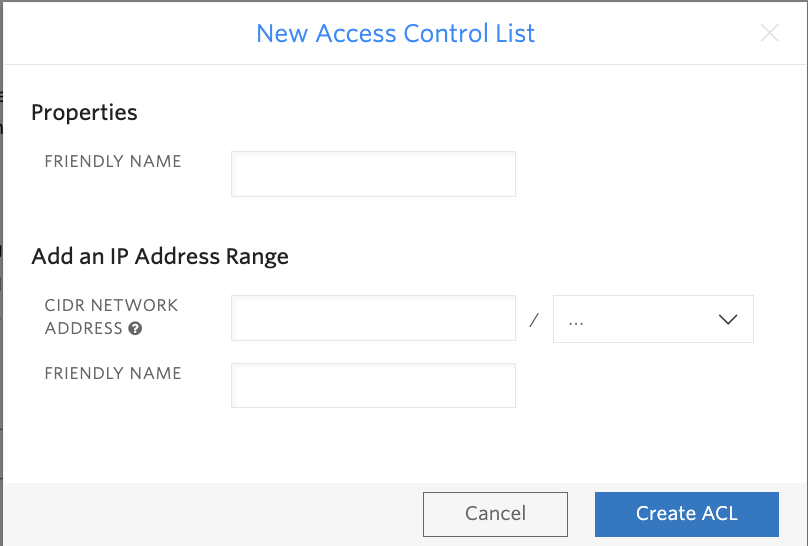 * **Friendly Name**: "Rounded ACL"
* **CIDR Network Address**: Contact [team@callrounded.com](mailto:team@callrounded.com) for Rounded IPs
### Method B: Credential Lists
1. Click **+** next to **Credential Lists**
2. Create new credentials:
* **Friendly Name**: "Rounded ACL"
* **CIDR Network Address**: Contact [team@callrounded.com](mailto:team@callrounded.com) for Rounded IPs
### Method B: Credential Lists
1. Click **+** next to **Credential Lists**
2. Create new credentials:
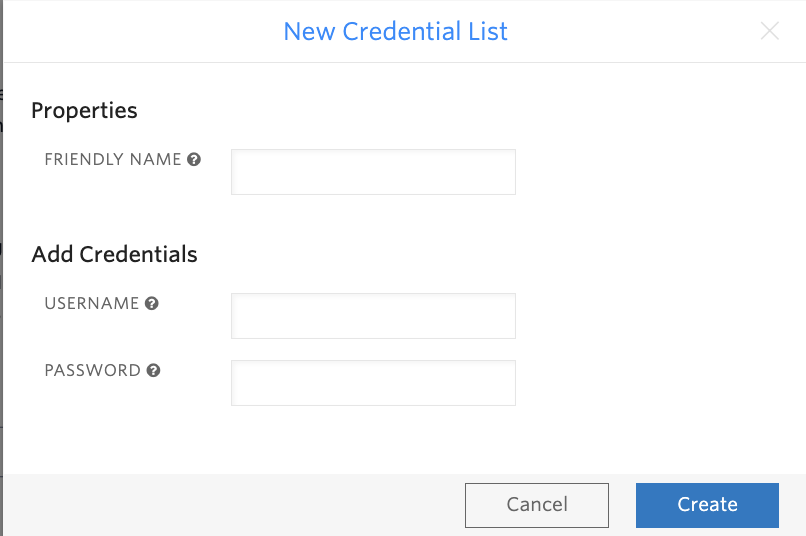 * **Friendly Name**: "Rounded Credentials"
* **Username**: Choose a username
* **Password**: Generate a secure password
## Step 4: Associate your numbers
1. Go to **Numbers** tab in your SIP Trunk
* **Friendly Name**: "Rounded Credentials"
* **Username**: Choose a username
* **Password**: Generate a secure password
## Step 4: Associate your numbers
1. Go to **Numbers** tab in your SIP Trunk
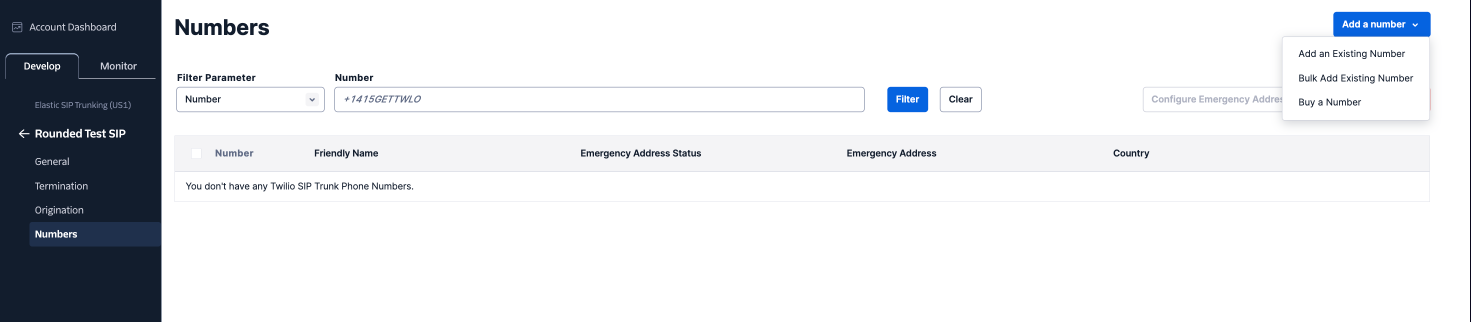 2. If you don't have numbers yet, click **Add a number** > **Buy a Number**
3. Or go to **Phone Numbers > Manage > Active numbers**
4. Select the number you want to connect
5. In the number configuration:
* **A call comes in**: Select "SIP Trunk"
* Choose your previously created trunk
## Step 5: General Settings (Optional)
Configure additional trunk settings in the **General** tab:
2. If you don't have numbers yet, click **Add a number** > **Buy a Number**
3. Or go to **Phone Numbers > Manage > Active numbers**
4. Select the number you want to connect
5. In the number configuration:
* **A call comes in**: Select "SIP Trunk"
* Choose your previously created trunk
## Step 5: General Settings (Optional)
Configure additional trunk settings in the **General** tab:
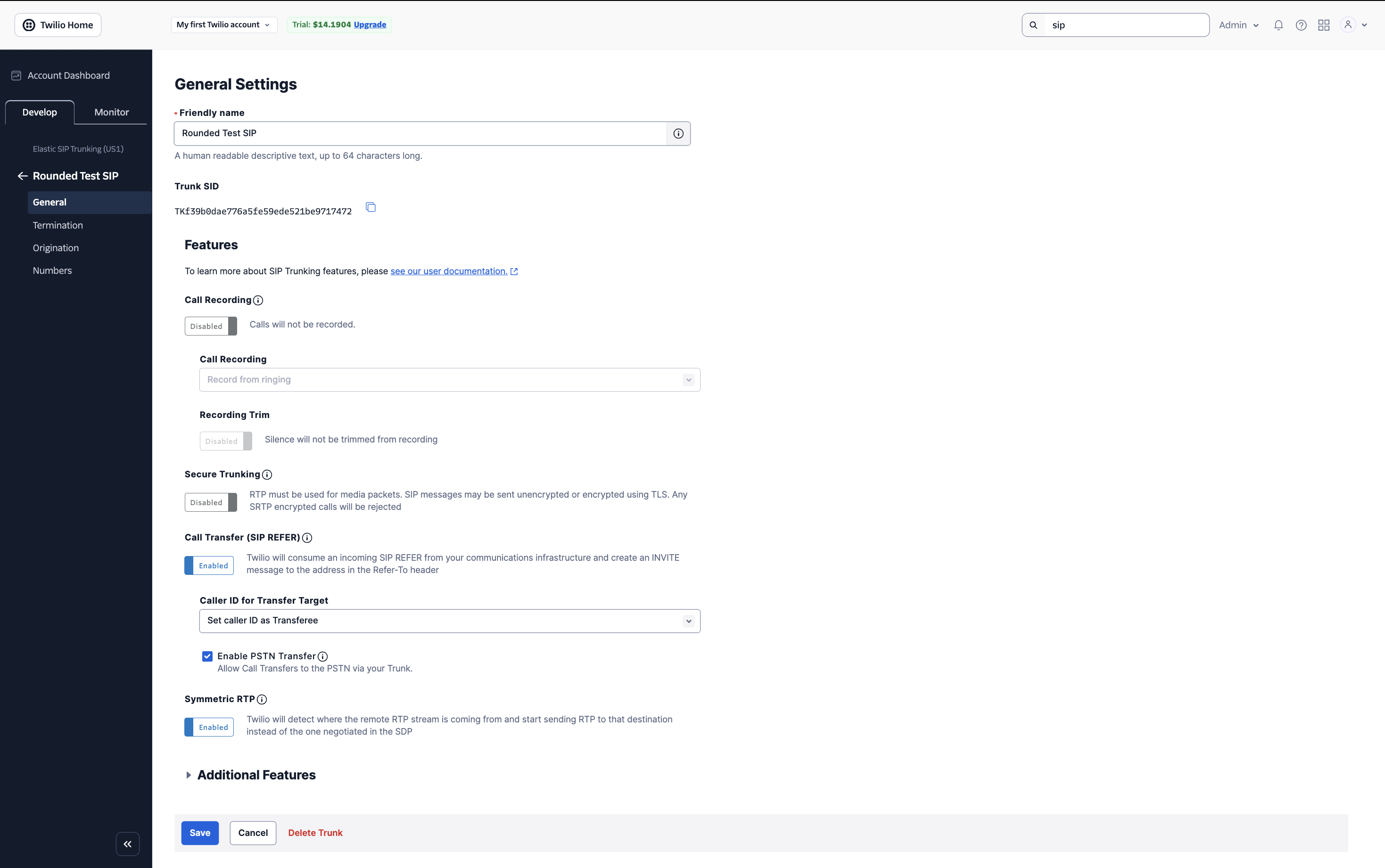 Key settings to review:
* **Friendly name**: Descriptive name for your trunk
* **Call Recording**: Enable if needed
* **Secure Trunking**: Enable for TLS/SRTP
* **Call Transfer (SIP REFER)**: Enable for call transfers
## Step 6: Configuration in Rounded
In the Rounded interface, configure your SIP trunk:
Key settings to review:
* **Friendly name**: Descriptive name for your trunk
* **Call Recording**: Enable if needed
* **Secure Trunking**: Enable for TLS/SRTP
* **Call Transfer (SIP REFER)**: Enable for call transfers
## Step 6: Configuration in Rounded
In the Rounded interface, configure your SIP trunk:
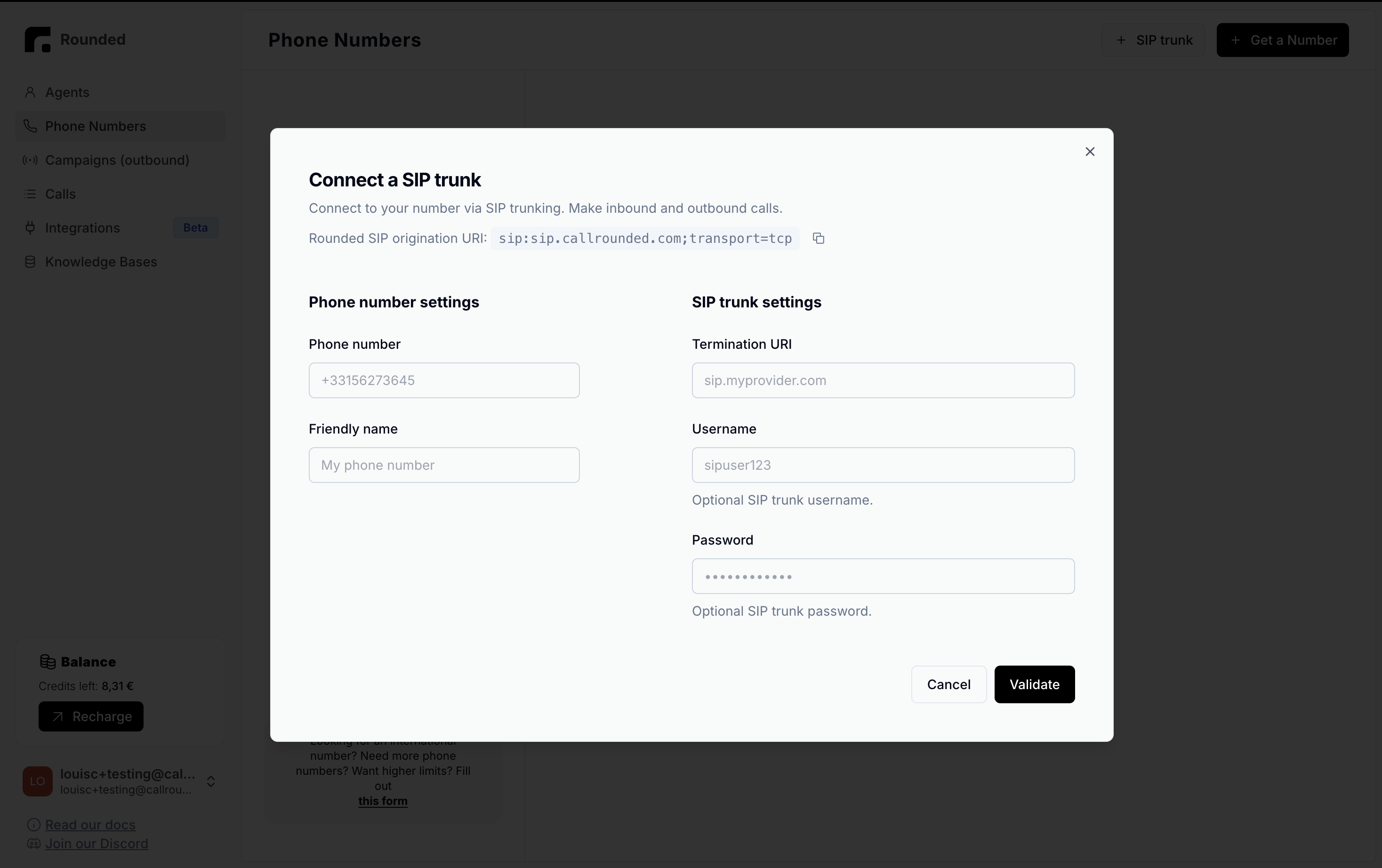 ### Number settings
* **Phone number**: Your Twilio number (e.g., +15551234567)
* **Friendly name**: "My Twilio number"
### SIP Trunk settings
* **Termination URI**: `your-trunk.pstn.twilio.com` (from step 3)
* **Username**: Leave empty (optional)
* **Password**: Leave empty (optional)
## Step 7: Test the configuration
1. In Rounded, create a simple voice agent
2. Assign it to your Twilio number
3. Test:
* **Inbound call**: Call your Twilio number
* **Outbound call**: Initiate a call from your agent
## Troubleshooting
### "403 Forbidden" error
* Check that the origination URI is correctly configured
* Make sure the trunk is active
### Inbound calls don't work
* Verify that the number is properly associated with the SIP trunk
* Check the webhook configuration in Twilio
### Degraded audio quality
* Check your internet connection
* Test with UDP protocol if TCP is problematic
## Pricing
Twilio charges:
* Inbound calls according to your plan
* Outbound calls at Twilio international rates
* Monthly fees for the SIP trunk (consult Twilio pricing)
## Support
For help:
* 📧 Rounded Support: [team@callrounded.com](mailto:team@callrounded.com)
* 📖 Twilio Documentation: [Twilio SIP Trunking](https://www.twilio.com/docs/sip-trunking)
* 🎫 Twilio Support: Twilio Console > Help & Support
⚠️ **Important**: Always test your configuration with non-critical calls before going into production.
### Number settings
* **Phone number**: Your Twilio number (e.g., +15551234567)
* **Friendly name**: "My Twilio number"
### SIP Trunk settings
* **Termination URI**: `your-trunk.pstn.twilio.com` (from step 3)
* **Username**: Leave empty (optional)
* **Password**: Leave empty (optional)
## Step 7: Test the configuration
1. In Rounded, create a simple voice agent
2. Assign it to your Twilio number
3. Test:
* **Inbound call**: Call your Twilio number
* **Outbound call**: Initiate a call from your agent
## Troubleshooting
### "403 Forbidden" error
* Check that the origination URI is correctly configured
* Make sure the trunk is active
### Inbound calls don't work
* Verify that the number is properly associated with the SIP trunk
* Check the webhook configuration in Twilio
### Degraded audio quality
* Check your internet connection
* Test with UDP protocol if TCP is problematic
## Pricing
Twilio charges:
* Inbound calls according to your plan
* Outbound calls at Twilio international rates
* Monthly fees for the SIP trunk (consult Twilio pricing)
## Support
For help:
* 📧 Rounded Support: [team@callrounded.com](mailto:team@callrounded.com)
* 📖 Twilio Documentation: [Twilio SIP Trunking](https://www.twilio.com/docs/sip-trunking)
* 🎫 Twilio Support: Twilio Console > Help & Support
⚠️ **Important**: Always test your configuration with non-critical calls before going into production.