> ## Documentation Index
> Fetch the complete documentation index at: https://docs.callrounded.com/llms.txt
> Use this file to discover all available pages before exploring further.
# Telnyx Configuration
> Step-by-step guide to configure a SIP trunk with Telnyx
## Prerequisites
* An active Telnyx account
* A Telnyx phone number or SIP trunk
* Access to the Telnyx portal
## Step 1: Create a SIP Connection
1. Log in to the [Telnyx Portal](https://portal.telnyx.com)
2. Navigate to **Voice > SIP Trunking** (or search for "SIP Connection")
3. Click **Create SIP Connection**
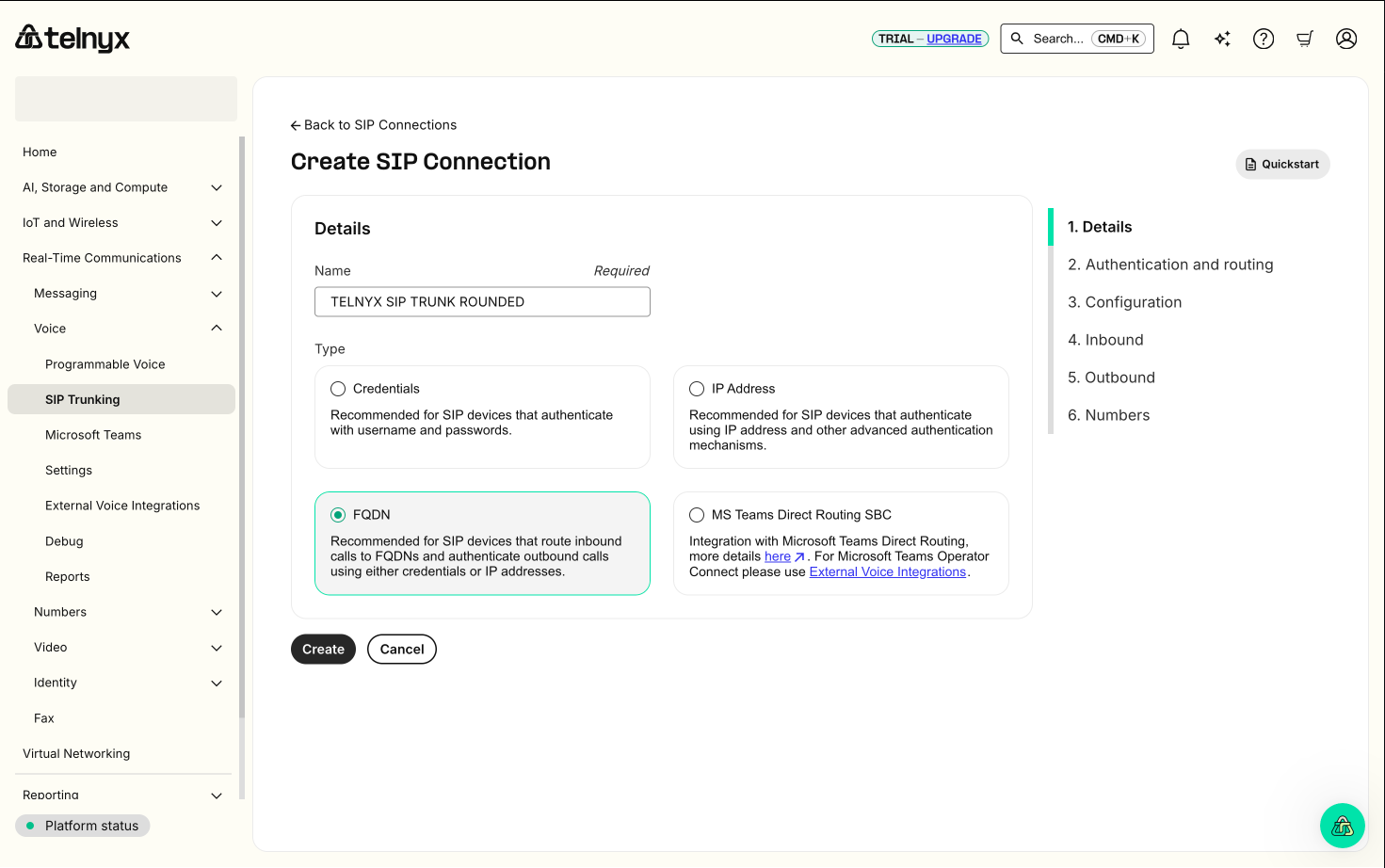
## Step 2: Configure Details
1. Enter connection details:
* **Name**: "TELNYX SIP TRUNK ROUNDED" (or your preferred name)
* **Type**: Select **FQDN** (recommended for Rounded integration)
 ## Step 3: Authentication and Routing
Choose your authentication method for outbound calls:
## Step 3: Authentication and Routing
Choose your authentication method for outbound calls:
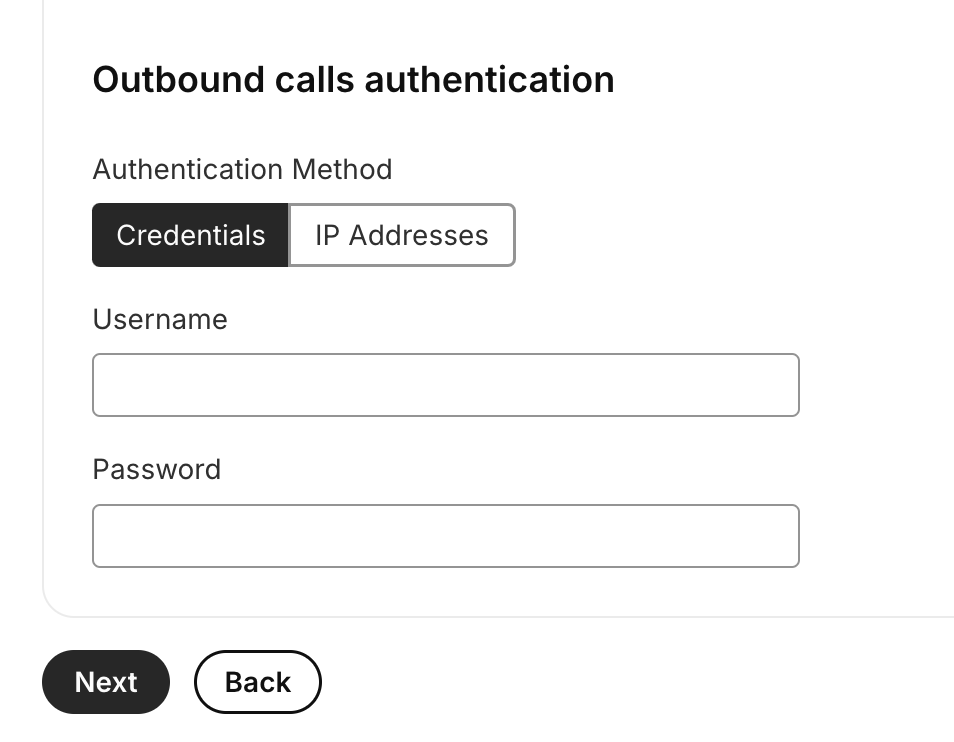 ### Method A: Credentials (Username/Password)
* Select **Credentials**
* Enter **Username** and **Password**
* Note these credentials for Rounded configuration
### Method B: IP Address Authentication
* Select **IP Addresses**
* Add Rounded server IPs (contact [team@callrounded.com](mailto:team@callrounded.com) for IPs)
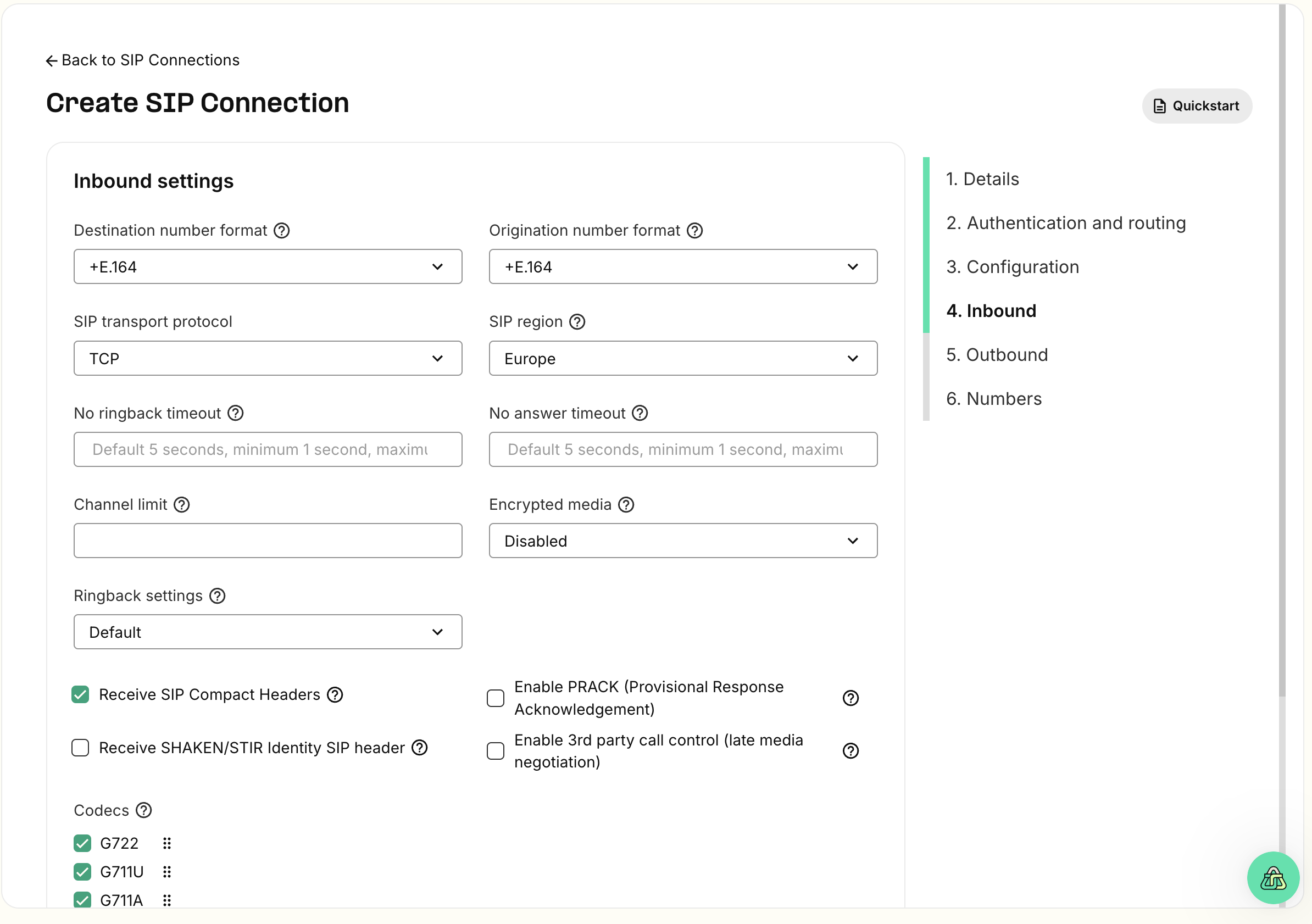
## Step 4: Inbound Configuration
Configure inbound call routing:
### Method A: Credentials (Username/Password)
* Select **Credentials**
* Enter **Username** and **Password**
* Note these credentials for Rounded configuration
### Method B: IP Address Authentication
* Select **IP Addresses**
* Add Rounded server IPs (contact [team@callrounded.com](mailto:team@callrounded.com) for IPs)
## Step 4: Inbound Configuration
Configure inbound call routing:
 1. **Add FQDN** for Rounded routing:
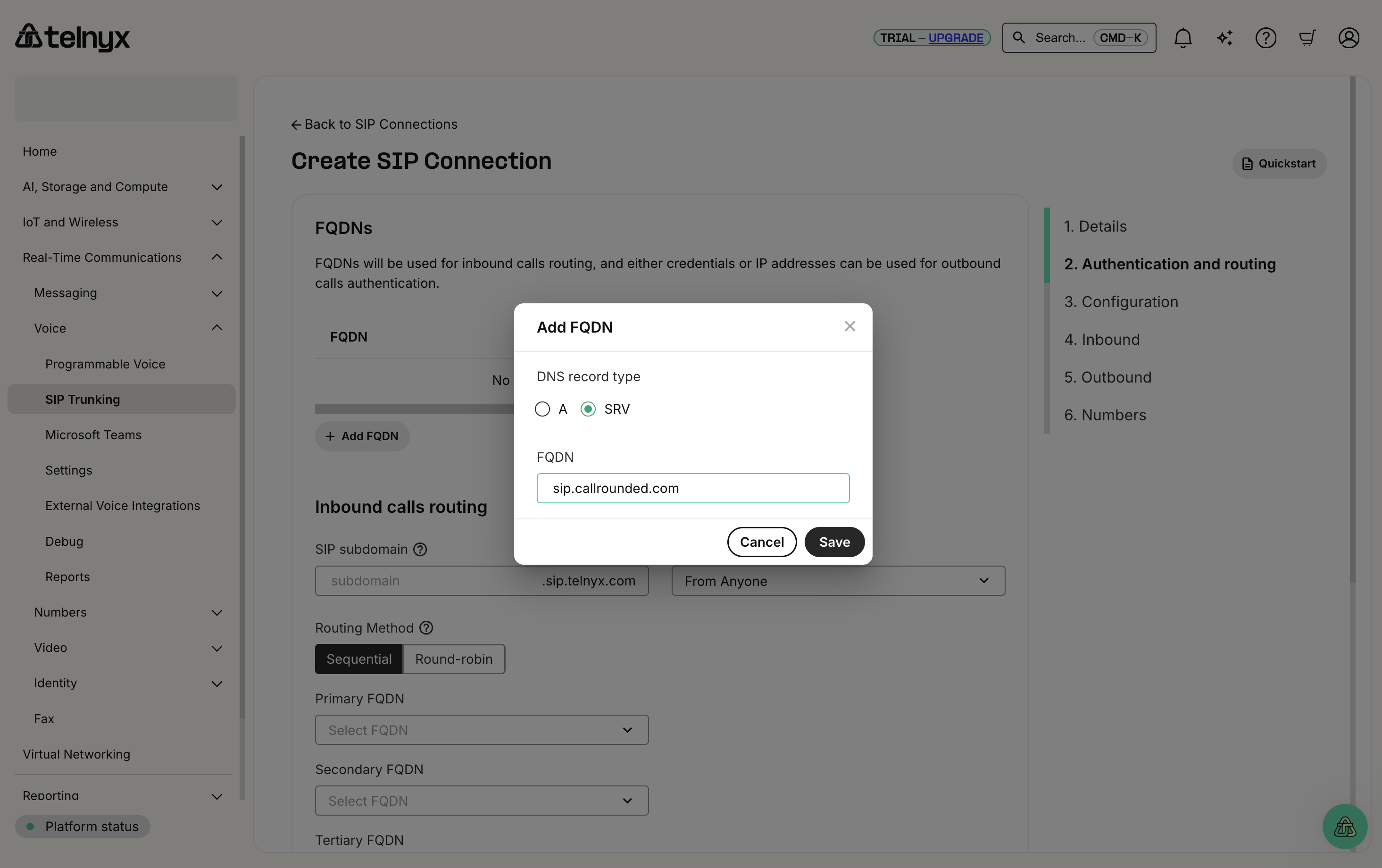 * **DNS record type**: SRV
* **FQDN**: `sip.callrounded.com`
2. Configure other inbound settings:
* **SIP transport protocol**: TCP (recommended)
* **SIP region**: Europe (or closest to your location)
* **Codecs**: G722, G711U, G711A (recommended)
## Step 5: Outbound Configuration
Configure outbound call settings:
* **DNS record type**: SRV
* **FQDN**: `sip.callrounded.com`
2. Configure other inbound settings:
* **SIP transport protocol**: TCP (recommended)
* **SIP region**: Europe (or closest to your location)
* **Codecs**: G722, G711U, G711A (recommended)
## Step 5: Outbound Configuration
Configure outbound call settings:
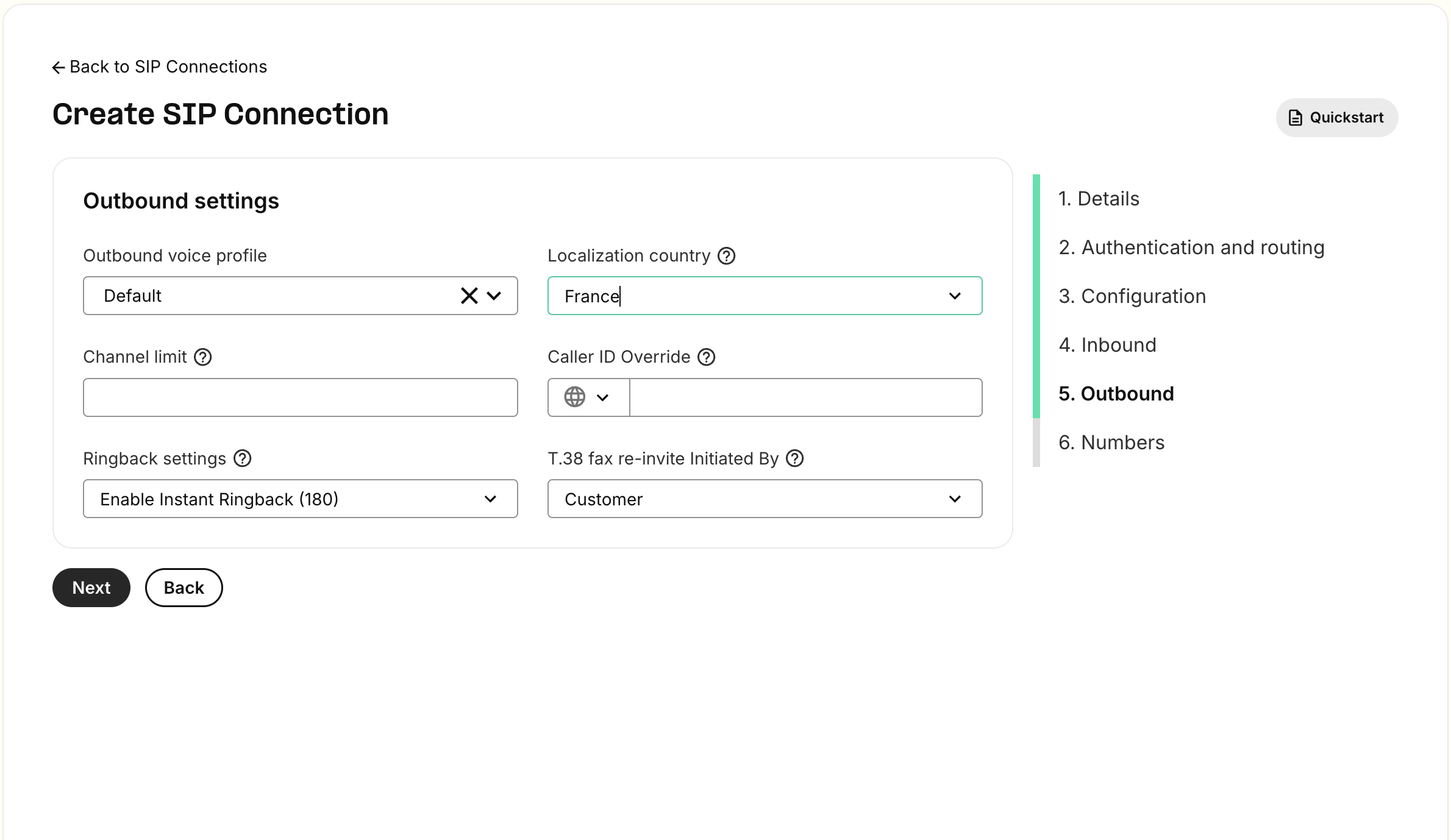 Key settings:
* **Outbound voice profile**: Default
* **Localization country**: Select your country
* **Channel limit**: Set according to your needs
* **Caller ID Override**: Configure if needed
## Step 6: Associate Numbers
After creating the connection, assign phone numbers:
Key settings:
* **Outbound voice profile**: Default
* **Localization country**: Select your country
* **Channel limit**: Set according to your needs
* **Caller ID Override**: Configure if needed
## Step 6: Associate Numbers
After creating the connection, assign phone numbers:
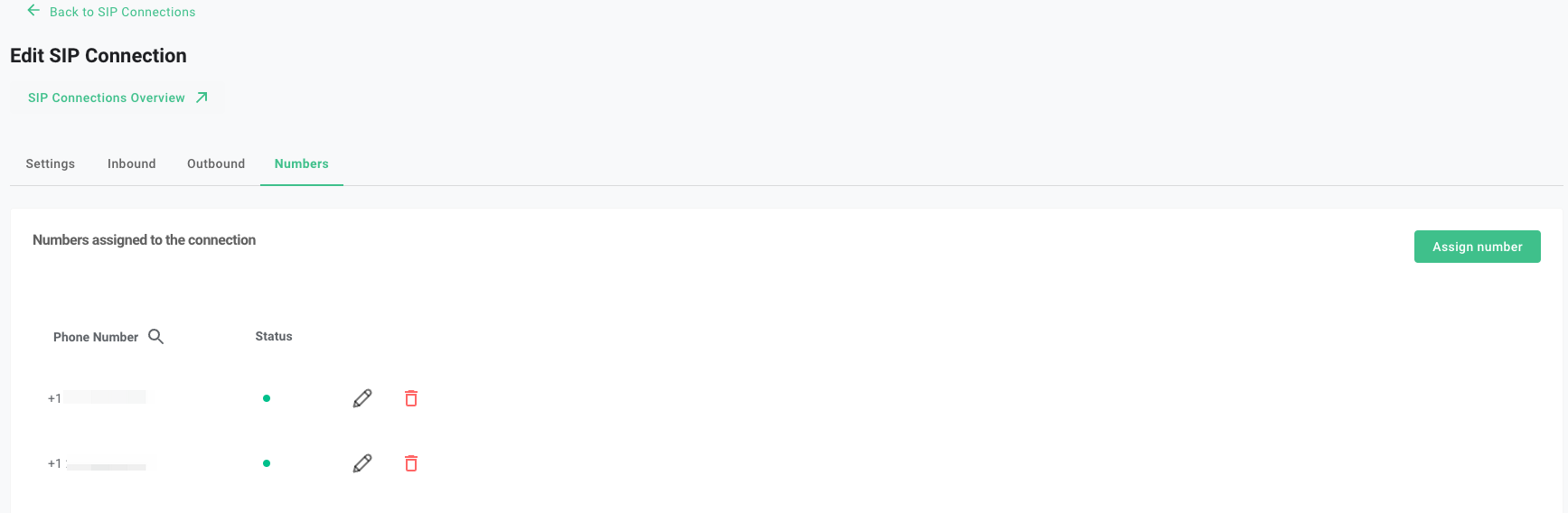 1. Go to the **Numbers** tab in your SIP connection
2. Click **Assign number** to add existing numbers
3. Or purchase new numbers if needed
## Step 7: Configuration in Rounded
In the Rounded interface, configure your SIP trunk:
1. Go to the **Numbers** tab in your SIP connection
2. Click **Assign number** to add existing numbers
3. Or purchase new numbers if needed
## Step 7: Configuration in Rounded
In the Rounded interface, configure your SIP trunk:
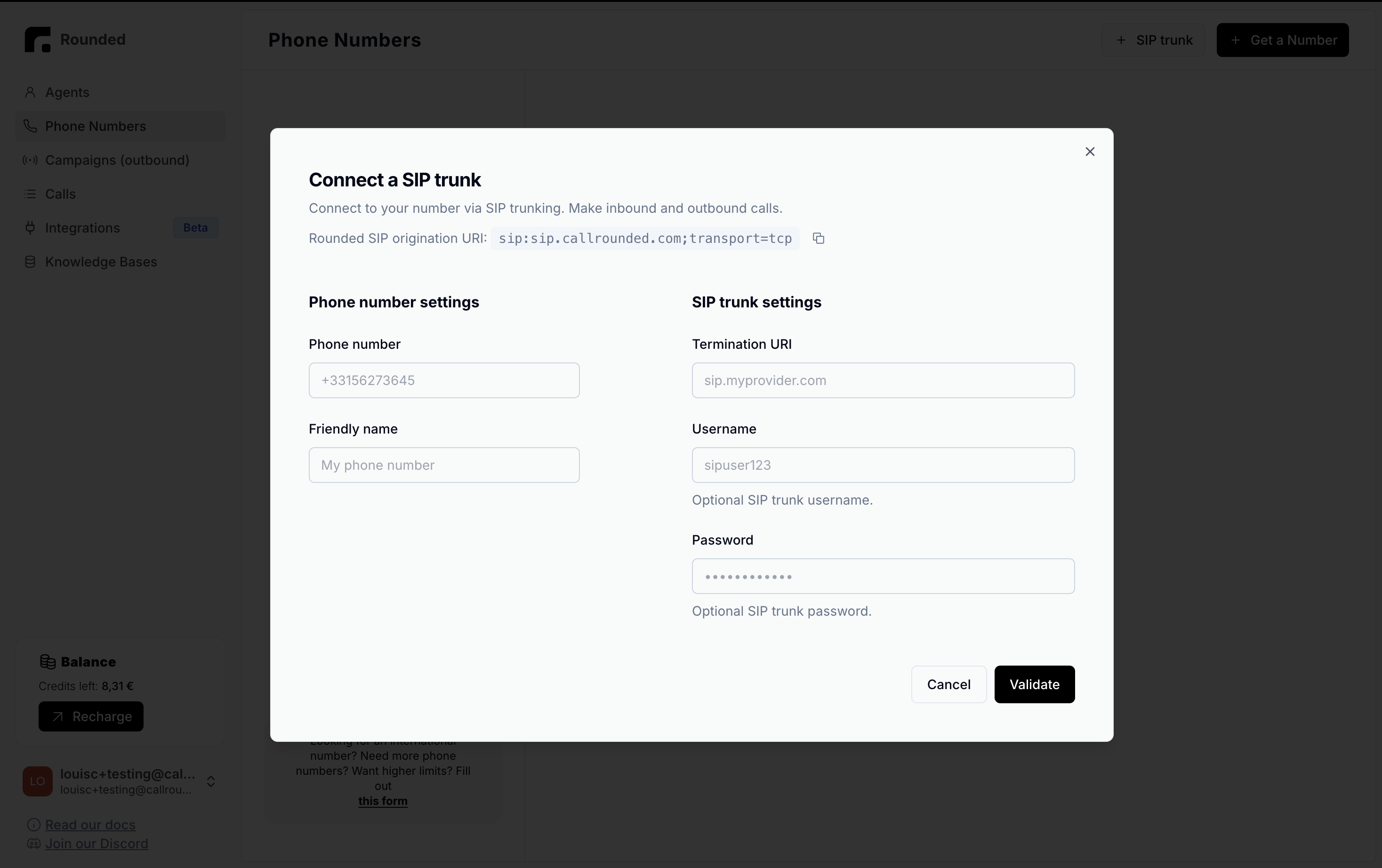 ### Number settings
* **Phone number**: Your Telnyx number (e.g., +15551234567)
* **Friendly name**: "My Telnyx number"
### SIP Trunk settings
* **Termination URI**: `sip.telnyx.com`
* **Username**: Your Telnyx username (if credential authentication selected)
* **Password**: Your Telnyx password (if credential authentication selected)
## Step 8: Test the Configuration
1. In Rounded, create a simple voice agent
2. Assign it to your Telnyx number
3. Test:
* **Inbound call**: Call your Telnyx number
* **Outbound call**: Initiate a call from your agent
## Troubleshooting
### "401 Unauthorized" error
* Check authentication credentials
* Verify that authentication is correctly configured
### Inbound calls don't pass
* Check the inbound routing configuration
* Ensure the Rounded URI is correctly configured
### Audio quality issues
* Check authorized codecs
* Test different codecs (G.722 recommended)
### "403 Forbidden" error
* Check the authorized IP list
* Contact Telnyx to confirm the configuration
## Pricing
Telnyx offers:
* Competitive rates for international calls
* No monthly fixed fees for SIP connections
* Per-second billing
* Volume-based discounts
See [Telnyx pricing grid](https://telnyx.com/pricing) for more details.
## Support
For help:
* 📧 Rounded Support: [team@callrounded.com](mailto:team@callrounded.com)
* 📖 Telnyx Documentation: [Telnyx SIP Trunking](https://developers.telnyx.com/docs/v2/sip-trunking)
* 🎫 Telnyx Support: Telnyx Portal > Support
## Telnyx Advantages
**Competitive rates**: Among the cheapest on the market\
**Global coverage**: Over 150 countries\
**Modern API**: Easy integration via REST API\
**Private network**: Dedicated infrastructure for quality
💡 **Tip**: Telnyx offers excellent quality/price ratio, particularly suited for high volumes.
### Number settings
* **Phone number**: Your Telnyx number (e.g., +15551234567)
* **Friendly name**: "My Telnyx number"
### SIP Trunk settings
* **Termination URI**: `sip.telnyx.com`
* **Username**: Your Telnyx username (if credential authentication selected)
* **Password**: Your Telnyx password (if credential authentication selected)
## Step 8: Test the Configuration
1. In Rounded, create a simple voice agent
2. Assign it to your Telnyx number
3. Test:
* **Inbound call**: Call your Telnyx number
* **Outbound call**: Initiate a call from your agent
## Troubleshooting
### "401 Unauthorized" error
* Check authentication credentials
* Verify that authentication is correctly configured
### Inbound calls don't pass
* Check the inbound routing configuration
* Ensure the Rounded URI is correctly configured
### Audio quality issues
* Check authorized codecs
* Test different codecs (G.722 recommended)
### "403 Forbidden" error
* Check the authorized IP list
* Contact Telnyx to confirm the configuration
## Pricing
Telnyx offers:
* Competitive rates for international calls
* No monthly fixed fees for SIP connections
* Per-second billing
* Volume-based discounts
See [Telnyx pricing grid](https://telnyx.com/pricing) for more details.
## Support
For help:
* 📧 Rounded Support: [team@callrounded.com](mailto:team@callrounded.com)
* 📖 Telnyx Documentation: [Telnyx SIP Trunking](https://developers.telnyx.com/docs/v2/sip-trunking)
* 🎫 Telnyx Support: Telnyx Portal > Support
## Telnyx Advantages
**Competitive rates**: Among the cheapest on the market\
**Global coverage**: Over 150 countries\
**Modern API**: Easy integration via REST API\
**Private network**: Dedicated infrastructure for quality
💡 **Tip**: Telnyx offers excellent quality/price ratio, particularly suited for high volumes.