> ## Documentation Index
> Fetch the complete documentation index at: https://docs.callrounded.com/llms.txt
> Use this file to discover all available pages before exploring further.
# Connect a SIP Trunk
> Configure your own phone number via SIP trunking for inbound and outbound calls
SIP trunking allows you to connect your own phone number to Rounded to receive and make calls. This solution is ideal for:
* Using your existing numbers
* Benefiting from preferential rates from your operator
* Keeping control over your telephony infrastructure
## Rounded SIP origination URI
To configure your SIP trunk, you will need to use this origination URI:
```
sip:sip.callrounded.com;transport=tcp
```
## Configuration methods
### Method 1: Elastic SIP Trunk (Recommended)
This method uses standard SIP trunk services from major providers. It's simple to configure and compatible with most operators.
**Documented providers:**
* [Twilio](/documentation/telephony/twilio-setup)
* [Telnyx](/documentation/telephony/telnyx-setup)
* [Zadarma](/documentation/telephony/zadarma-setup)
**Other providers:** Any standard SIP trunk provider will work with Rounded. The above are just our documented examples.
### Method 2: Custom configuration
For specific needs or advanced configurations, contact our technical team:
📧 **[team@callrounded.com](mailto:team@callrounded.com)**
Our team will support you with:
* Custom SIP configurations
* Integrations with existing PBX systems
* Multi-tenant configurations
* Dedicated technical support
## Configuration in Rounded
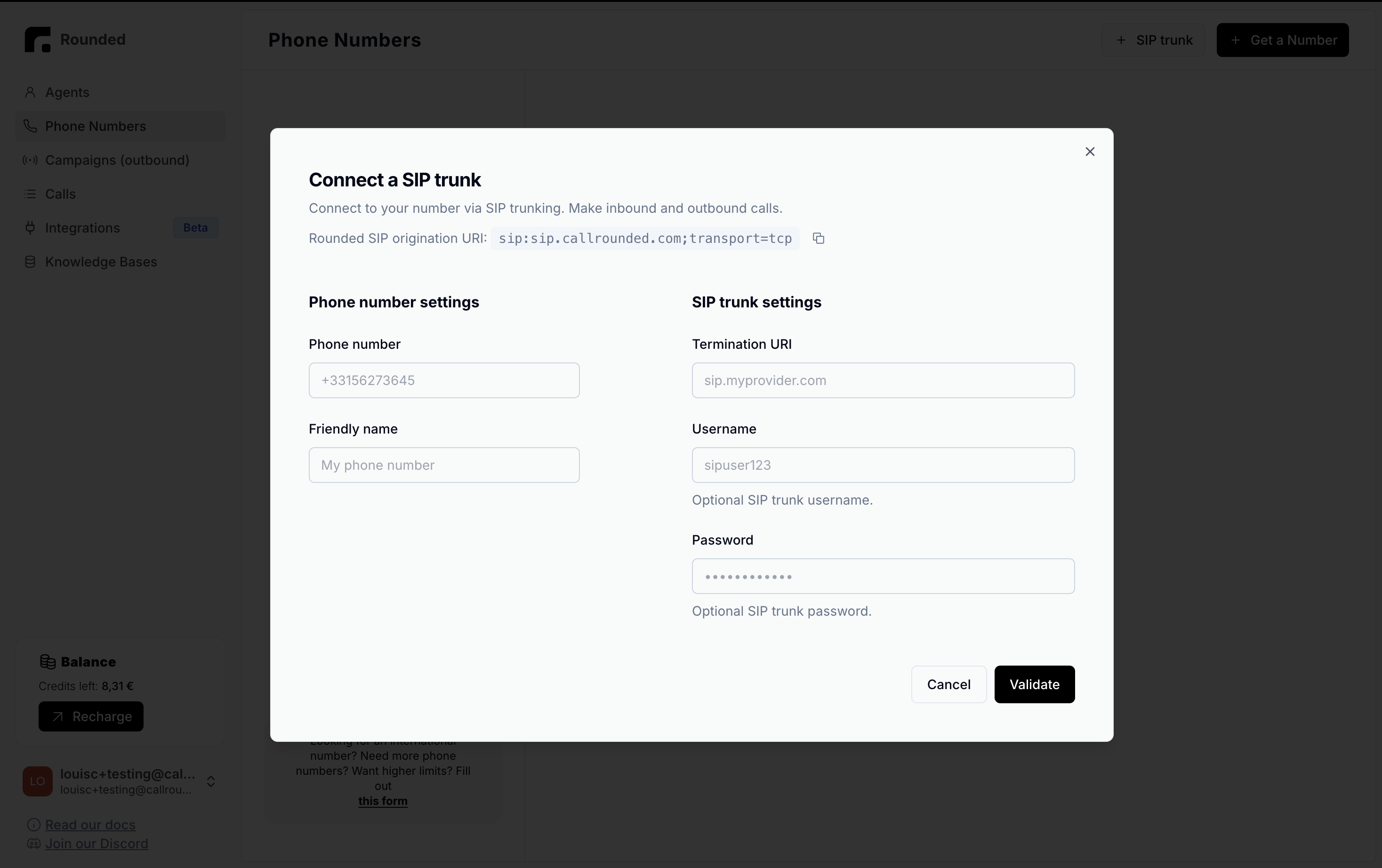 ### 1. Phone number settings
* **Phone number**: Your number in international format (e.g.: +33156273645)
* **Friendly name**: A descriptive name to easily identify this number
### 2. SIP Trunk settings
* **Termination URI**: Your provider's SIP address (e.g.: sip.myprovider.com)
* **Username**: Optional, provided by your SIP operator
* **Password**: Optional, provided by your SIP operator
## Call flows
### Outbound calls
When your Rounded agent makes a call:
1. Rounded routes the call to your termination URI
2. Your SIP provider routes the call to the recipient
3. The caller ID displayed is the one configured
### Inbound calls
When someone calls your number:
1. Your SIP provider receives the call
2. It transfers it to the Rounded URI: `sip:sip.callrounded.com;transport=tcp`
3. Rounded triggers your voice agent
## SIP Trunk advantages
**Reduced costs**: Use your negotiated rates\
**Flexibility**: Keep your existing numbers\
**Scalability**: Easily add new numbers\
**Reliability**: Redundancy and high availability
## Next steps
1. Choose your SIP provider - use our documented guides ([Twilio](/documentation/telephony/twilio-setup), [Telnyx](/documentation/telephony/telnyx-setup), [Zadarma](/documentation/telephony/zadarma-setup)) or **any other SIP provider**
2. Configure your SIP trunk according to the provider's guide
3. Test the configuration with a test call
4. Deploy your voice agents
**Using a different provider?** No problem! Any standard SIP trunk will work - just use the Rounded origination URI: `sip:sip.callrounded.com;transport=tcp`
💡 **Tip**: Start with a test number before migrating your production numbers.
### 1. Phone number settings
* **Phone number**: Your number in international format (e.g.: +33156273645)
* **Friendly name**: A descriptive name to easily identify this number
### 2. SIP Trunk settings
* **Termination URI**: Your provider's SIP address (e.g.: sip.myprovider.com)
* **Username**: Optional, provided by your SIP operator
* **Password**: Optional, provided by your SIP operator
## Call flows
### Outbound calls
When your Rounded agent makes a call:
1. Rounded routes the call to your termination URI
2. Your SIP provider routes the call to the recipient
3. The caller ID displayed is the one configured
### Inbound calls
When someone calls your number:
1. Your SIP provider receives the call
2. It transfers it to the Rounded URI: `sip:sip.callrounded.com;transport=tcp`
3. Rounded triggers your voice agent
## SIP Trunk advantages
**Reduced costs**: Use your negotiated rates\
**Flexibility**: Keep your existing numbers\
**Scalability**: Easily add new numbers\
**Reliability**: Redundancy and high availability
## Next steps
1. Choose your SIP provider - use our documented guides ([Twilio](/documentation/telephony/twilio-setup), [Telnyx](/documentation/telephony/telnyx-setup), [Zadarma](/documentation/telephony/zadarma-setup)) or **any other SIP provider**
2. Configure your SIP trunk according to the provider's guide
3. Test the configuration with a test call
4. Deploy your voice agents
**Using a different provider?** No problem! Any standard SIP trunk will work - just use the Rounded origination URI: `sip:sip.callrounded.com;transport=tcp`
💡 **Tip**: Start with a test number before migrating your production numbers.